Friday, 22 September 2017

Asp.Net C# blank on Chart.SaveImage Saving chart from web give blank image

When export chart in c# using Chart1.SaveImage method , I got white image only.

I used below code to export chart as image , but I got as blank white screen only.

            MemoryStream stream = new MemoryStream();
            Chart1.SaveImage(stream, ChartImageFormat.Jpeg);
            BinaryReader binrayRdr = new BinaryReader(stream);
            byte[] bytes1 = ((MemoryStream)stream).ToArray();
            Response.Clear();
            Response.ContentType = "image/png";
            Response.AddHeader("Content-Disposition", "attachment; filename=HTML.png");
            Response.Buffer = true;
            Response.Cache.SetCacheability(HttpCacheability.NoCache);
            Response.BinaryWrite(bytes1);
            Response.End();


I found solution for this issue(may not be a right way) this may useful to someone who is struck on this.
I load the chart druing load_chart button click event
here ,
MemoryStream str = new MemoryStream();
Chart1.SaveImage(str);
Session["exportImage"] = str;
we have separate Export button , paste the following code in this event,
byte[] bytes1 = ((MemoryStream)Session["exportImage"]).ToArray();
            Response.Clear();
            Response.ContentType = "image/png";
            Response.AddHeader("Content-Disposition", "attachment; filename=HTML.png");
            Response.Buffer = true;
            Response.Cache.SetCacheability(HttpCacheability.NoCache);
            Response.BinaryWrite(bytes1);
            Response.End();

Its Working for me.

Tuesday, 19 September 2017

Asp.Net c# export Chart to Image

using System.IO;

protected void btnExport_Click(object sender, EventArgs e)
        {
            MemoryStream stream=new MemoryStream();           
            Chart1.SaveImage(stream, ChartImageFormat.Jpeg);
            BinaryReader binrayRdr = new BinaryReader(stream);
            byte[] bytes = ((MemoryStream)stream).ToArray();
            Response.Clear();
            Response.ContentType = "image/png";
            Response.AddHeader("Content-Disposition", "attachment; filename=HTML.png");
            Response.Buffer = true;
            Response.Cache.SetCacheability(HttpCacheability.NoCache);
            Response.BinaryWrite(bytes);
            Response.End();
        }

Friday, 24 February 2017

Get column names of measure and dimensions from sql Cube

SELECT [CATALOG_NAME] as [DATABASE],  CUBE_NAME AS [CUBE],[DIMENSION_UNIQUE_NAME] AS [DIMENSION],  HIERARCHY_DISPLAY_FOLDER AS [FOLDER],HIERARCHY_CAPTION AS [DIMENSION ATTRIBUTE],  HIERARCHY_IS_VISIBLE AS [VISIBLE]  FROM $system.MDSchema_hierarchies
WHERE CUBE_NAME  ='data warehouse'AND HIERARCHY_ORIGIN=2

SELECT [CATALOG_NAME] as [DATABASE],  CUBE_NAME AS [CUBE],[MEASUREGROUP_NAME] AS [FOLDER],[MEASURE_CAPTION] AS [MEASURE],[MEASURE_IS_VISIBLE]
FROM $SYSTEM.MDSCHEMA_MEASURES
WHERE CUBE_NAME  ='data warehouse'

Sunday, 18 December 2016

Save multiple charts as Image in C# winforms windows application

This is about how to save charts or control or WindowsForm save as Image

private void copyChartToolStripMenuItem_Click(object sender, EventArgs e)
        {
            
            using (MemoryStream ms = new MemoryStream())
            {
               
              
                Rectangle sourceRect = pnlMain.ClientRectangle;
                Size targetSize = new Size(pnlMain.Width,pnlMain.Height);
                using (Bitmap tmp = new Bitmap(sourceRect.Width, sourceRect.Height, System.Drawing.Imaging.PixelFormat.Format32bppArgb))
                {
                    pnlMain.DrawToBitmap(tmp, sourceRect);
                    using (Graphics g = Graphics.FromImage(tmp))
                    {
                        g.DrawImage(tmp, new Rectangle(Point.Empty, targetSize));
                    }
                    Clipboard.SetImage(tmp);
                }
               
            }

        }


Monday, 22 December 2014

csv file to DataTable in C#

  private static object GetDataTabletFromCSVFile(string csv_file_path)
        {
            DataTable csvData = new DataTable();

            try
            {

                using (TextFieldParser csvReader = new TextFieldParser(csv_file_path))
                {
                    csvReader.SetDelimiters(new string[] { "," });
                    csvReader.HasFieldsEnclosedInQuotes = true;
                    string[] colFields = csvReader.ReadFields();
                    foreach (string column in colFields)
                    {
                        DataColumn datecolumn = new DataColumn(column);
                        datecolumn.AllowDBNull = true;
                        csvData.Columns.Add(datecolumn);
                    }
                    bool isInvoiceMissed = false, isBaseAmountMissed = false;
                    while (!csvReader.EndOfData)
                    {
                        string[] fieldData = csvReader.ReadFields();

                        if (string.IsNullOrEmpty(fieldData[0].ToString()) || fieldData[0].ToString() == "0")
                            isInvoiceMissed = true;

                        if (string.IsNullOrEmpty(fieldData[21].ToString()))
                            isBaseAmountMissed = true;

                        //Making empty value as null
                        for (int i = 0; i < fieldData.Length; i++)
                        {
                            if (fieldData[i] == "")
                            {
                                fieldData[i] = null;
                            }
                        }
                        csvData.Rows.Add(fieldData);
                    }
                    if (isInvoiceMissed && !isBaseAmountMissed)
                        return 1;//"Invoice is missing in Excel files";
                    else if (!isInvoiceMissed && isBaseAmountMissed)
                        return 2;//"Base amount is missing in Excel files";
                    else if (isInvoiceMissed && isBaseAmountMissed)
                        return 3;
                    else
                        return csvData;
                }
            }
            catch (Exception ex)
            {
            }
            return csvData;
        }

Friday, 28 November 2014

the remote computer requires network level authentication which your computer does not support xp

how to fix windows RDP client

To fix windows 7 or XP SP3 clients do the following


• Configure Network Level Authentication


1. Click Start, click Run, type regedit, and then press ENTER.

2. In the navigation pane, locate and then click the following registry
subkey: HKEY_LOCAL_MACHINE\SYSTEM\CurrentControlSet\Control\Lsa

3. In the details pane, right-click Security Packages, and then click Modify.

4. In the Value data box, type tspkg. Leave any data that is specific to other SSPs, and then click OK.

5. In the navigation pane, locate and then click the following registry
subkey:
HKEY_LOCAL_MACHINE\SYSTEM\CurrentControlSet\Control\SecurityProviders

6. In the details pane, right-click SecurityProviders, and then click Modify.

7. In the Value data box, type credssp.dll. Leave any data that is specific to other SSPs, and then click OK.

8. Exit Registry Editor.

9. Restart the computer.

http://technet.microsoft.com/en-in/library/cc732713.aspx 

Wednesday, 5 November 2014

Tamil Font in Skype

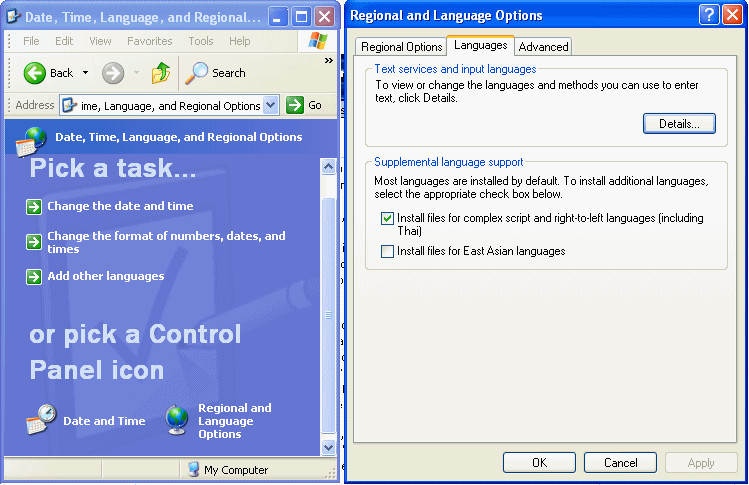
  1. Click on "Start->Control Panel->(Date, Time, Language and Regional Options)->Regional and Language Options"
  2. Click on 'Languages' tab (next to 'Regional Options') at the top
  3. In 'Supplemental language support', see whether "Install files for complex script and right to left languages (including thai)" is kept ticked.
  4. If ticked, leave it as it is. This means your computer is already fully enabled for Unicode. You need not do anything further and skip the steps below.
  5. If not ticked, tick it (but please read the 'Important Note' below before ticking). It will install the required files and ask you to reboot

http://www.azhagi.com/pics/azp-unicode-enable.gif

Tuesday, 15 July 2014

DataSet to JSON, JSON to DataSet , and JSON to DataTable C#

DataSet to JSON
using Newtonsoft.Json;
         //objUserValidation is dataset variable and it contains tables
string jsonValue = JsonConvert.SerializeObject(objUserValidation, Formatting.Indented);


 JSON to DataSet
  using Newtonsoft.Json; 

             System.Data.DataSet ds = new System.Data.DataSet();
                System.Xml.XmlDocument xd = new System.Xml.XmlDocument();

               //jsonValue it contains json value
                 xd = (System.Xml.XmlDocument)JsonConvert.DeserializeXmlNode(jsonValue.ToString(), "jsonValue");

                ds.ReadXml(new System.Xml.XmlNodeReader(xd));


Thursday, 15 May 2014

DataSet to Excel in asp.net sample example.

 public static void Excell(DataSet ds)
        {
            try
            {
                string FileName = "F:\\Testing-"+System.DateTime.Now.Hour.ToString()+"-"+DateTime.Now.Minute.ToString()+".xslx";
                //DataSet ds = new DataSet("myDataset");
                ds.DataSetName = "myDataset";

                Microsoft.Office.Interop.Excel.Application ExcelApp = new Microsoft.Office.Interop.Excel.Application();

                Workbook ExcelWorkBook = null;

                Worksheet ExcelWorkSheet = null;


                ExcelApp.Visible = true;

                ExcelWorkBook = ExcelApp.Workbooks.Add(XlWBATemplate.xlWBATWorksheet);

               
                List<string> SheetNames = new List<string>();
                for (int j = 0; j < ds.Tables.Count; j++)
                {
                    SheetNames.Add(ds.Tables[j].TableName);
                }
               
                for (int i = 1; i < ds.Tables.Count; i++)
                    ExcelWorkBook.Worksheets.Add(); //Adding New sheet in Excel Workbook


                for (int i = 0; i < ds.Tables.Count; i++)
                {
                    int r = 1; // Initialize Excel Row Start Position  = 1
                    ExcelWorkSheet = ExcelWorkBook.Worksheets[i + 1];
                    //Writing Columns Name in Excel Sheet
                    for (int col = 1; col < ds.Tables[i].Columns.Count; col++)
                        ExcelWorkSheet.Cells[r, col] = ds.Tables[i].Columns[col - 1].ColumnName;
                    r++;

                    //Writing Rows into Excel Sheet

                    for (int row = 0; row < ds.Tables[i].Rows.Count; row++) //r stands for ExcelRow and col for ExcelColumn
                    {
                        // Excel row and column start positions for writing Row=1 and Col=1
                        for (int col = 1; col < ds.Tables[i].Columns.Count; col++)

                            ExcelWorkSheet.Cells[r, col] = ds.Tables[i].Rows[row][col - 1].ToString();

                        r++;

                    }

                    ExcelWorkSheet.Name = SheetNames[i];//Renaming the ExcelSheets
                }

                ExcelWorkBook.SaveAs(FileName);
                ExcelWorkBook.Close();
                ExcelApp.Quit();
                Marshal.ReleaseComObject(ExcelWorkSheet);
                Marshal.ReleaseComObject(ExcelWorkBook);
                Marshal.ReleaseComObject(ExcelApp);
            }
            catch (Exception ex)
            {

            }
        }
using Microsoft.Office.Interop;
using Microsoft.Office.Interop.Excel;

Monday, 12 May 2014

Find Last Date Time Updated for Any Table

SQL SERVER – Find Last Date Time Updated for Any Table

I just received an email from one of my regular readers who is curious to know if there is any way to find out when a table is recently updated. I was ready with my answer! I promptly suggested him that if a table contains UpdatedDate or ModifiedDate date column with default together with value GETDATE(), he should make use of it. On close observation the table is not required to keep history when any row is inserted. However, the sole prerequisite is to be aware of when any table has been updated. That’s it!
If a user wants to finds out when was the last table updated he can query dynamic management view (dmv) – sys.dm_db_index_usage_stats and easily figure out when was the table updated last. Let us comprehend this example by creating a table and updating it. We can use dmv to determine when it was updated last.
USE AdventureWorks
GO
CREATE TABLE Test
(ID INT,
COL VARCHAR(100))
GO
INSERT INTO Test
SELECT 1,'First'
UNION ALL
SELECT 2,'Second'
GO

Now we have created a table and populated it with data. Next, we will run the following query to find out when it was last updated.
SELECT OBJECT_NAME(OBJECT_ID) AS DatabaseName, last_user_update,*
FROM sys.dm_db_index_usage_stats
WHERE database_id = DB_ID( 'AdventureWorks')
AND
OBJECT_ID=OBJECT_ID('test')

Running query provides accurate details of when was  the table last updated. If WHERE condition is entirely removed it will provide details of the entire database.


Thursday, 17 April 2014

Date Comparison in C# with millisecond

            DateTime dt1 = Convert.ToDateTime("04/17/2014 04:05:25.8652258 AM");
            DateTime dt2 = Convert.ToDateTime("04/17/2014 04:05:25.8652258 PM");
            int Res = DateTime.Compare(dt1, dt2);//args[0] is latest time, args[1] is old time
            

If Res returns 0(zero) then both values are equal.
If Res returns -1 then dt2 is the latest time
If Res returns 1 then the condition is true. dt1 is latest. 

Monday, 7 April 2014

SQL Result as vertical

create table test (CustomerID int,CustomerName varchar(50),Location varchar(50))
Insert into test values (101,'IBM','NY'),(102,'MSFT','WA')
select * from test
--Method-1
Select Col,Val from test
cross apply (values('customerID',Cast(customerID as varchar(50))),('CustomerName',CustomerName),('Location',Location) ) d(Col,Val)


--Method-2
Select Col,Val from (select Cast(customerID as varchar(50)) as customerID,CustomerName,Location from test) src
unpivot (val For col in ([customerID],[CustomerName],[Location])) unpvt

drop table test

Friday, 21 March 2014

Simple gridview to pdf using iTextSharp

public void GridToPdf()
    {


        GridView gv = new GridView();
        DataTable Data = new DataTable();
        Data.Columns.Add("Sno");
        Data.Columns.Add("Name");
        DataRow DR = Data.NewRow();
        DR["Sno"] = "1";
        DR["Name"] = "Name of a person";

        Data.Rows.Add(DR);

        Response.ContentType = "application/pdf";
        Response.AddHeader("content-disposition", "attachment;filename=" + lblTitle.Text + ".pdf");
        Response.Cache.SetCacheability(HttpCacheability.NoCache);
        System.IO.StringWriter sw = new System.IO.StringWriter();
        HtmlTextWriter hw = new HtmlTextWriter(sw);
        gv.BorderStyle = BorderStyle.None;
        gv.DataSource = Data;
        gv.HeaderStyle.Font.Bold = true;
        gv.DataBind();
       
        gv.RenderControl(hw);
        string str1 = sw.ToString();
        System.IO.StringReader sr = new System.IO.StringReader(str1);
        iTextSharp.text.Document pdfDoc = new iTextSharp.text.Document(iTextSharp.text.PageSize.A4.Rotate(), 40f, 10f, 40f, 2f);
        iTextSharp.text.html.simpleparser.HTMLWorker htmlparser = new iTextSharp.text.html.simpleparser.HTMLWorker(pdfDoc);
        iTextSharp.text.pdf.PdfWriter.GetInstance(pdfDoc, Response.OutputStream);
        iTextSharp.text.pdf.PdfWriter wrt = iTextSharp.text.pdf.PdfWriter.GetInstance(pdfDoc, Response.OutputStream);
        pdfDoc.Open();
        htmlparser.Parse(sr);
        pdfDoc.Close();
        Response.End();

    }

Monday, 17 March 2014

Password Encryption and Compare in SQL Server 2008

declare @r varchar(50)
declare @t varbinary(255)
set @r='Sa'
select @t=PWDENCRYPT('sa')

select PWDCOMPARE('sa',@t)
-- it returns 1(Password correct!)

From  http://msmvps.com/blogs/gladchenko/archive/2005/04/06/41083.aspx
 

Saturday, 15 March 2014

How to convert number into words in c# code.

Code get from 
public string retWord(int number)
  {

      if (number == 0) return "Zero";
      if (number == -2147483648) return "Minus Two Hundred and Fourteen Crore Seventy Four Lakh Eighty Three Thousand Six Hundred and Forty Eight";
      int[] num = new int[4];
      int first = 0;
      int u, h, t;
      System.Text.StringBuilder sb = new System.Text.StringBuilder();

      if (number < 0)
      {
          sb.Append("Minus");
          number = -number;
      }
      string[] words0 = { "", "One ", "Two ", "Three ", "Four ", "Five ", "Six ", "Seven ", "Eight", "Nine " };
      string[] words = { "Ten ", "Eleven ", "Twelve ", "Thirteen ", "Fourteen ", "Fifteen ", "Sixteen ", "Seventeen ", "Eighteen ", "Nineteen " };

      string[] words2 = { "Twenty", "Thirty ", "Forty ", "Fifty ", "Sixty ", "Seventy ", "Eighty", "Ninety " };

      string[] words3 = { "Thousand ", "Lakh ", "Crore " };

      num[0] = number % 1000; // units

      num[1] = number / 1000;

      num[2] = number / 100000;

      num[1] = num[1] - 100 * num[2]; // thousands

      num[3] = number / 10000000; // crores

      num[2] = num[2] - 100 * num[3]; // lakhs
      for (int i = 3; i > 0; i--)
      {
          if (num[i] != 0)
          {
              first = i;
              break;
          }
      }
      for (int i = first; i >= 0; i--)
      {
          if (num[i] == 0) continue;

          u = num[i] % 10; // ones

          t = num[i] / 10;

          h = num[i] / 100; // hundreds

          t = t - 10 * h; // tens

          if (h > 0) sb.Append(words0[h] + "Hundred ");

          if (u > 0 || t > 0)
          {
              if (h > 0 || i == 0) sb.Append("and ");
              if (t == 0)
                  sb.Append(words0[u]);

              else if (t == 1)
                  sb.Append(words[u]);
              else
                  sb.Append(words2[t - 2] + words0[u]);
          }

          if (i != 0) sb.Append(words3[i - 1]);
      }
      return sb.ToString().TrimEnd();

  }  

Thursday, 13 March 2014

select whole year date as data in sql server

DECLARE @FromDate DATETIME, @ToDate DATETIME;
SET @FromDate = '1900-01-01';
SET @ToDate = '2040-12-31';

-- all days in that period
SELECT TOP (DATEDIFF(DAY, @FromDate, @ToDate)+1)
  TheDate = DATEADD(DAY, number, @FromDate)
  FROM [master].dbo.spt_values
  WHERE [type] = N'P' ORDER BY number;

-- just the months in that period
SELECT TOP (DATEDIFF(MONTH, @FromDate, @ToDate)+1)
  TheDate  = DATEADD(MONTH, number, @FromDate),
  TheMonth = MONTH(DATEADD(MONTH, number, @FromDate)),
  TheYear  = YEAR(DATEADD(MONTH, number, @FromDate))
  FROM [master].dbo.spt_values
  WHERE [type] = N'P' ORDER BY number;
 
also
http://stackoverflow.com/questions/4273723/what-is-the-purpose-of-system-table-table-master-spt-values-and-what-are-the-me

Friday, 7 March 2014

Set Tooltip for each items in DropdownList asp.net C#

ddlRelatedPGMA.Attributes.Add("title", ddlRelatedPGMA.SelectedItem.Text);
foreach (ListItem li in ddlRelatedPGMA.Items)
 {
   li.Attributes.Add("title", li.Text);
 }


public void setToolTip(DropDownList ddl)
{
 ddl.Attributes.Add("title", ddl.SelectedItem.Text);
foreach (ListItem li in ddl.Items)
 {
   li.Attributes.Add("title", li.Text);
 }
}

Wednesday, 5 March 2014

Text ellipsis in gridview.

.textEllipsis
{
    overflow: hidden;
    max-width: 130px;/* Number of text to be appear before three dots (...)  */
    text-overflow: ellipsis;
     white-space: nowrap;
     width:60px;
/*
     This will used in gridview, it shows text with followed by three dots. For example if
      mrn value is  MRN-XX-0001 and it looks like MRN-XX-...
*/

}
Step-1:
 Add the above css style into style sheet like "kaizen-style.css"

Step-2:
 <asp:TemplateField HeaderText="PO Number" ItemStyle-Width="6%">
    <ItemTemplate>
       <div class="textEllipsis">
          <asp:Label ID="lblPONum" runat="server" Text='<%# Bind("PONumber") %>'></asp:Label>
       </div>
    </ItemTemplate>
</asp:TemplateField>


Then we may use tooltip to show the PONnumber as full.