Tuesday, 19 September 2017

Asp.Net c# export Chart to Image

using System.IO;

protected void btnExport_Click(object sender, EventArgs e)
        {
            MemoryStream stream=new MemoryStream();           
            Chart1.SaveImage(stream, ChartImageFormat.Jpeg);
            BinaryReader binrayRdr = new BinaryReader(stream);
            byte[] bytes = ((MemoryStream)stream).ToArray();
            Response.Clear();
            Response.ContentType = "image/png";
            Response.AddHeader("Content-Disposition", "attachment; filename=HTML.png");
            Response.Buffer = true;
            Response.Cache.SetCacheability(HttpCacheability.NoCache);
            Response.BinaryWrite(bytes);
            Response.End();
        }

Friday, 24 February 2017

Get column names of measure and dimensions from sql Cube

SELECT [CATALOG_NAME] as [DATABASE],  CUBE_NAME AS [CUBE],[DIMENSION_UNIQUE_NAME] AS [DIMENSION],  HIERARCHY_DISPLAY_FOLDER AS [FOLDER],HIERARCHY_CAPTION AS [DIMENSION ATTRIBUTE],  HIERARCHY_IS_VISIBLE AS [VISIBLE]  FROM $system.MDSchema_hierarchies
WHERE CUBE_NAME  ='data warehouse'AND HIERARCHY_ORIGIN=2

SELECT [CATALOG_NAME] as [DATABASE],  CUBE_NAME AS [CUBE],[MEASUREGROUP_NAME] AS [FOLDER],[MEASURE_CAPTION] AS [MEASURE],[MEASURE_IS_VISIBLE]
FROM $SYSTEM.MDSCHEMA_MEASURES
WHERE CUBE_NAME  ='data warehouse'

Sunday, 18 December 2016

Save multiple charts as Image in C# winforms windows application

This is about how to save charts or control or WindowsForm save as Image

private void copyChartToolStripMenuItem_Click(object sender, EventArgs e)
        {
            
            using (MemoryStream ms = new MemoryStream())
            {
               
              
                Rectangle sourceRect = pnlMain.ClientRectangle;
                Size targetSize = new Size(pnlMain.Width,pnlMain.Height);
                using (Bitmap tmp = new Bitmap(sourceRect.Width, sourceRect.Height, System.Drawing.Imaging.PixelFormat.Format32bppArgb))
                {
                    pnlMain.DrawToBitmap(tmp, sourceRect);
                    using (Graphics g = Graphics.FromImage(tmp))
                    {
                        g.DrawImage(tmp, new Rectangle(Point.Empty, targetSize));
                    }
                    Clipboard.SetImage(tmp);
                }
               
            }

        }


Monday, 22 December 2014

csv file to DataTable in C#

  private static object GetDataTabletFromCSVFile(string csv_file_path)
        {
            DataTable csvData = new DataTable();

            try
            {

                using (TextFieldParser csvReader = new TextFieldParser(csv_file_path))
                {
                    csvReader.SetDelimiters(new string[] { "," });
                    csvReader.HasFieldsEnclosedInQuotes = true;
                    string[] colFields = csvReader.ReadFields();
                    foreach (string column in colFields)
                    {
                        DataColumn datecolumn = new DataColumn(column);
                        datecolumn.AllowDBNull = true;
                        csvData.Columns.Add(datecolumn);
                    }
                    bool isInvoiceMissed = false, isBaseAmountMissed = false;
                    while (!csvReader.EndOfData)
                    {
                        string[] fieldData = csvReader.ReadFields();

                        if (string.IsNullOrEmpty(fieldData[0].ToString()) || fieldData[0].ToString() == "0")
                            isInvoiceMissed = true;

                        if (string.IsNullOrEmpty(fieldData[21].ToString()))
                            isBaseAmountMissed = true;

                        //Making empty value as null
                        for (int i = 0; i < fieldData.Length; i++)
                        {
                            if (fieldData[i] == "")
                            {
                                fieldData[i] = null;
                            }
                        }
                        csvData.Rows.Add(fieldData);
                    }
                    if (isInvoiceMissed && !isBaseAmountMissed)
                        return 1;//"Invoice is missing in Excel files";
                    else if (!isInvoiceMissed && isBaseAmountMissed)
                        return 2;//"Base amount is missing in Excel files";
                    else if (isInvoiceMissed && isBaseAmountMissed)
                        return 3;
                    else
                        return csvData;
                }
            }
            catch (Exception ex)
            {
            }
            return csvData;
        }

Friday, 28 November 2014

the remote computer requires network level authentication which your computer does not support xp

how to fix windows RDP client

To fix windows 7 or XP SP3 clients do the following


• Configure Network Level Authentication


1. Click Start, click Run, type regedit, and then press ENTER.

2. In the navigation pane, locate and then click the following registry
subkey: HKEY_LOCAL_MACHINE\SYSTEM\CurrentControlSet\Control\Lsa

3. In the details pane, right-click Security Packages, and then click Modify.

4. In the Value data box, type tspkg. Leave any data that is specific to other SSPs, and then click OK.

5. In the navigation pane, locate and then click the following registry
subkey:
HKEY_LOCAL_MACHINE\SYSTEM\CurrentControlSet\Control\SecurityProviders

6. In the details pane, right-click SecurityProviders, and then click Modify.

7. In the Value data box, type credssp.dll. Leave any data that is specific to other SSPs, and then click OK.

8. Exit Registry Editor.

9. Restart the computer.

http://technet.microsoft.com/en-in/library/cc732713.aspx 

Wednesday, 5 November 2014

Tamil Font in Skype

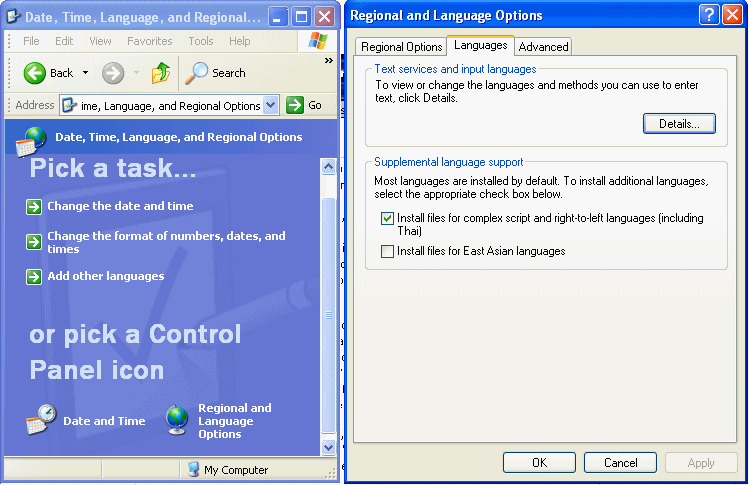
  1. Click on "Start->Control Panel->(Date, Time, Language and Regional Options)->Regional and Language Options"
  2. Click on 'Languages' tab (next to 'Regional Options') at the top
  3. In 'Supplemental language support', see whether "Install files for complex script and right to left languages (including thai)" is kept ticked.
  4. If ticked, leave it as it is. This means your computer is already fully enabled for Unicode. You need not do anything further and skip the steps below.
  5. If not ticked, tick it (but please read the 'Important Note' below before ticking). It will install the required files and ask you to reboot

http://www.azhagi.com/pics/azp-unicode-enable.gif